Keep the handover moving.
Reception can handle checkout while the vet finishes their notes. Work on different parts of the same record without taking turns.
THE PLATFORM FOR YOUR VETERINARY PRACTICE
From the first appointment to the final follow-up. Bring your diary, clinical work and billing together, so your team can get on with care.

Made for the reality of practice
A busy waiting room. A consult running over. A client ready to pay. roan keeps the next person moving, with the right information already in front of them.
Reception can handle checkout while the vet finishes their notes. Work on different parts of the same record without taking turns.
Bring the household, clinical history, medication and money into one view. Pick up the conversation with context.
Know what needs attention, who is working on a record and what will happen when you commit a change.
A day in roan
Explore the actual product, from a full diary to a settled account.
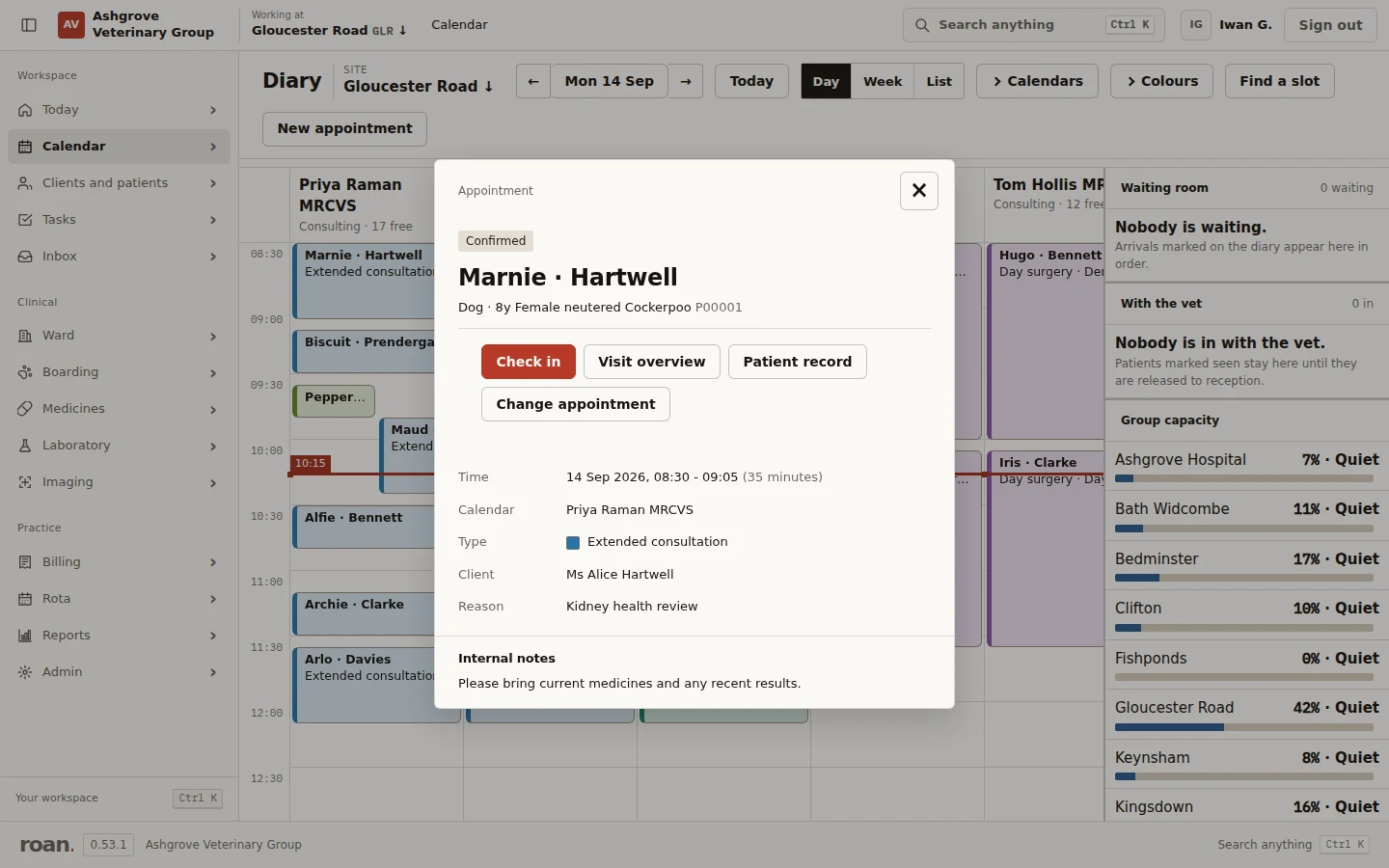
See the patient, appointment reason and next action without leaving the diary. A quick hover gives you the summary; open the booking to check in, review the patient record or change the appointment.
Clinical history, structured notes and suggested items share the consultation workspace. Review the work, then hand over to reception.
View full-size screen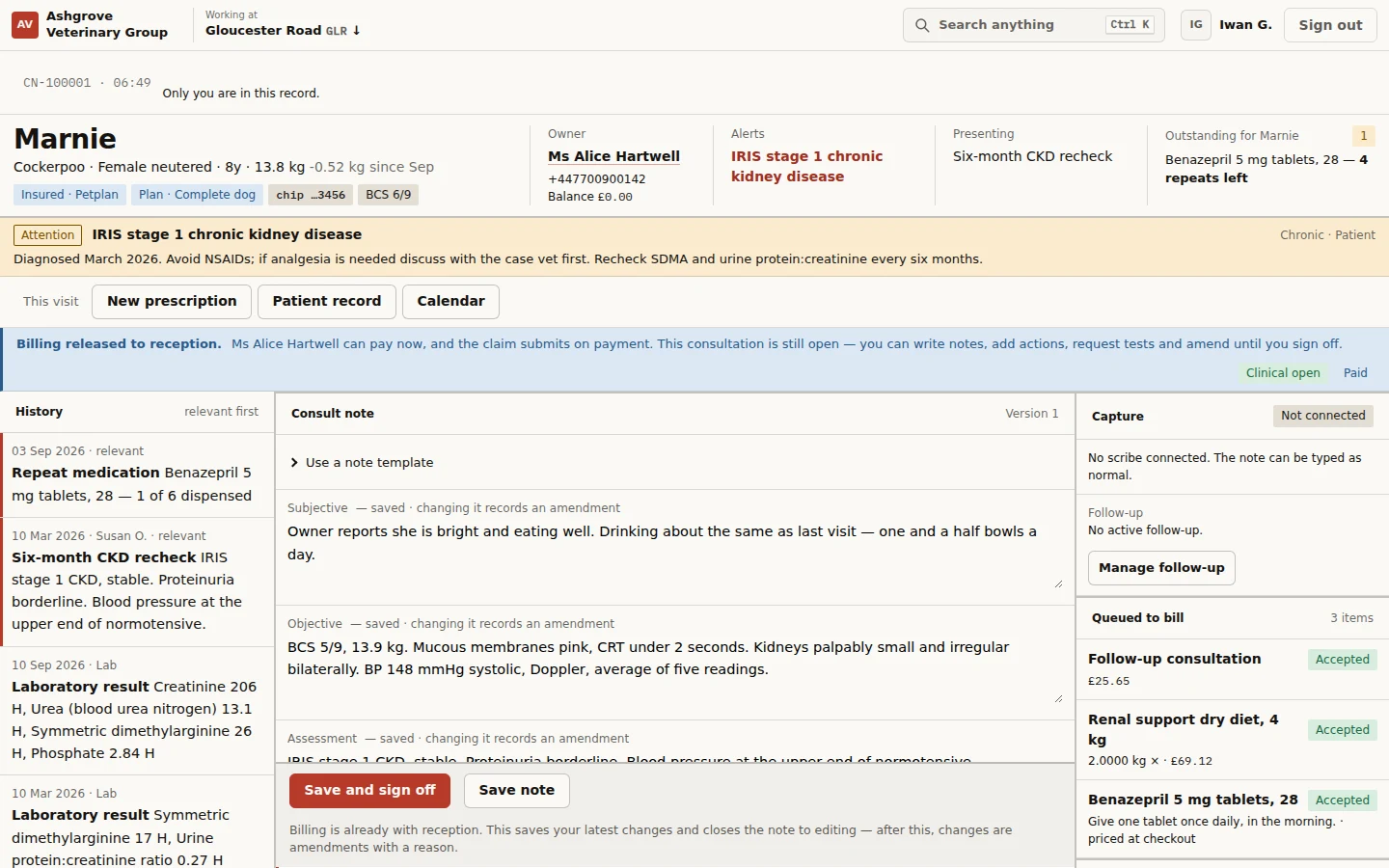
See the animal’s history alongside the client’s other pets, health plans and account. The clinical and financial story stays connected.
View full-size screen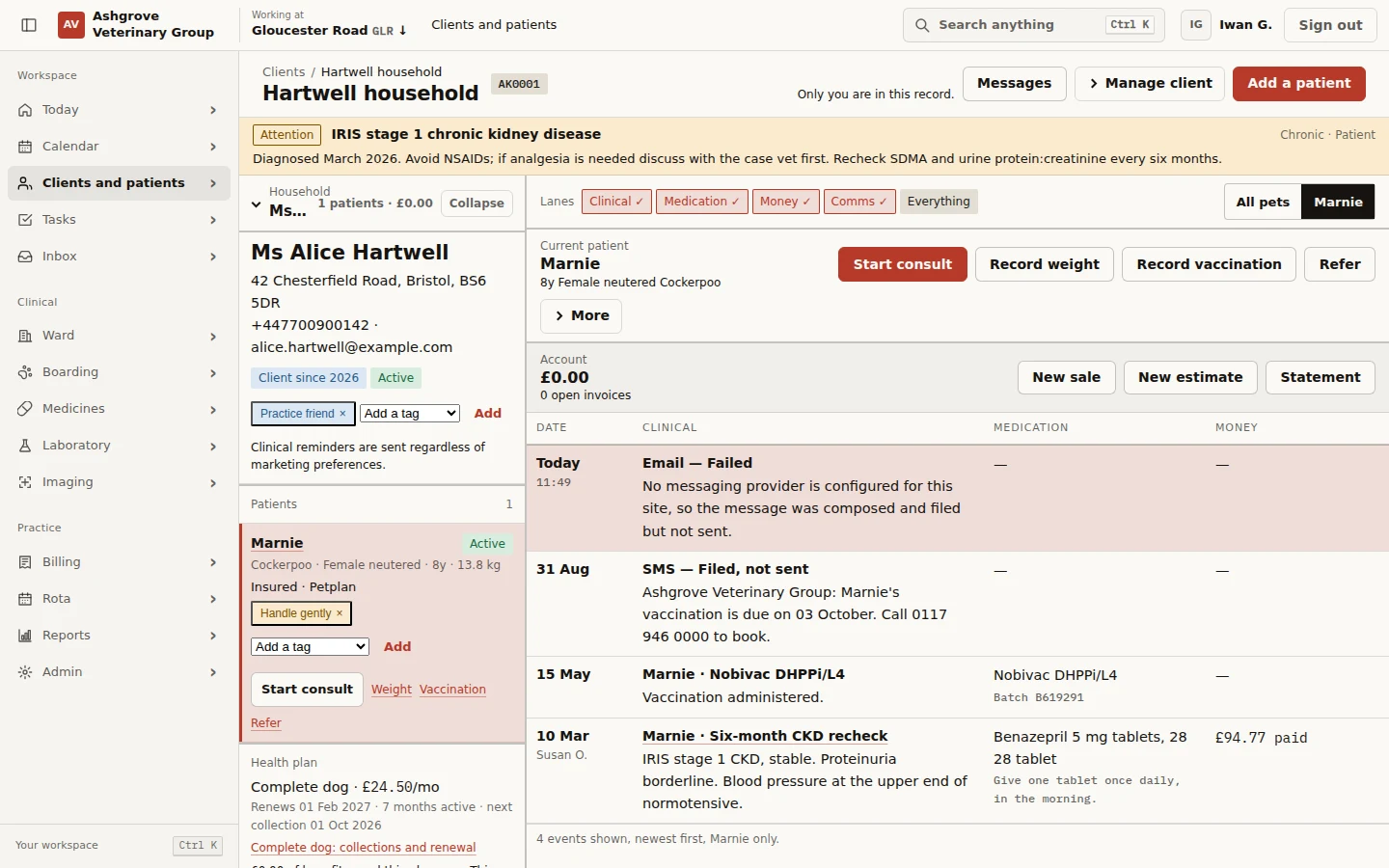
Bring the itemised invoice, health-plan savings and balance due into focus. Reception can settle the account while clinical notes are completed.
View full-size screen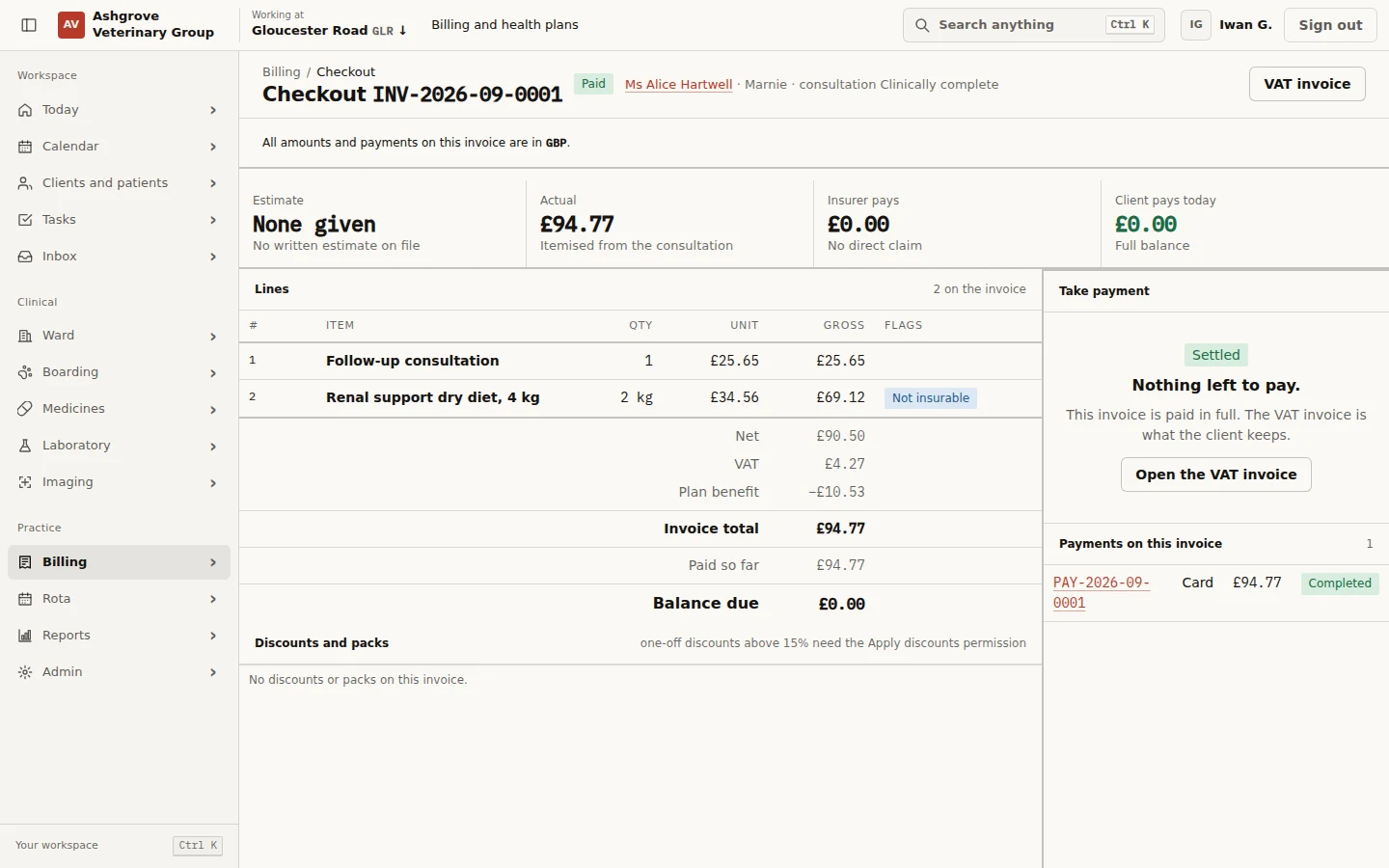
Real roan screens. All people, practices and patient records shown are demonstration data.
Built into your platform
Explore the clinical application included with roan. External services depend on the providers and accounts configured for your practice.
Offer online booking with configured appointment types and intake questions. In the diary, select an empty slot to book, then check in and call through from the appointment.
Use structured note templates, review suggestions and retain amendments. Release billing to reception while clinical notes remain open.
Track laboratory requests, imaging studies, prescriptions and dispensing. Review medicine collection and home-care instructions during the visit handover.
Work with estimates, invoices and payment records. Link a return appointment to the follow-up plan and assign tasks with completion notes.
Mobile-friendly. Offline-capable.
From the consulting room to a visit away from the practice, keep the patient in view on your phone or tablet.
Check appointments, open patient details and reach the next action on a smaller screen. The same roan workspace, without needing to return to a desk.
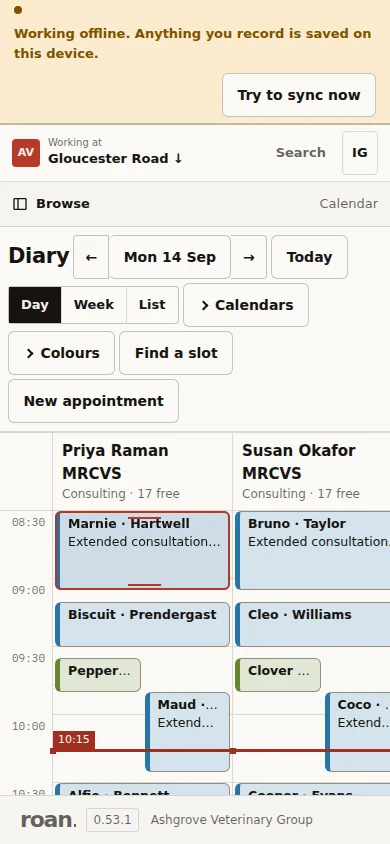
With offline support set up on your device, previously opened records remain available. Supported notes, weights and bookings are saved on the device and queued to sync when the connection returns.
roan shows when you are offline and what is waiting to sync. Card payments, insurance checks and lab requests still need a connection.
Try the demo on your phone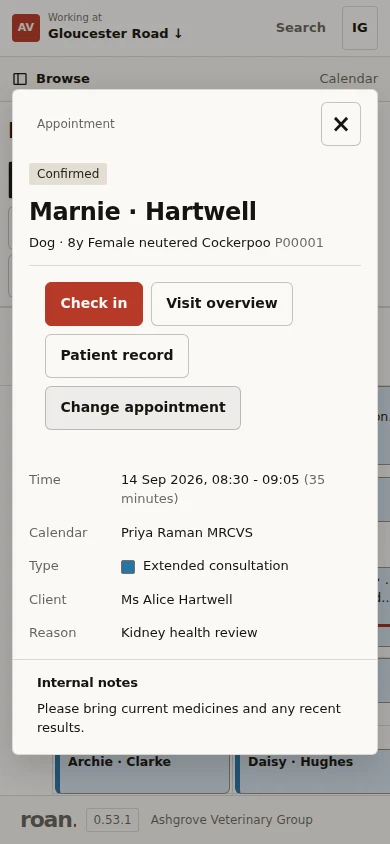
Thoughtful AI, inside the workflow
Let AI help draft the work around care. Keep the decisions with the people delivering it.
Explore the workspaceGenerate clinical-note and item suggestions from a supplied transcript through the scribe API. Review each suggestion before accepting it into the record. Live audio capture requires a connected transcription service.
Use plain-English constraints to help draft a rota, with checks before it reaches the reviewer.
A named person accepts or rejects each suggestion. The decision stays attributable.
One platform. Two ways to make it yours.
Both include appointments, patient records, billing and follow-up. The difference is who looks after the extra services.
You can mix the two: use your own AI account and let Roan handle messaging, for example.
An API key securely connects your existing service account to Roan. You add it once in settings, then use AI and messaging in the same everyday screens. You pay those services directly.
This is Bring Your Own Key (BYOK). Roan is a platform as a service (PaaS): the complete practice system is included, with room to connect your own services or build on the API. Supported AI connections include OpenAI, Anthropic and xAI, plus hosted Meta Llama models. Available features depend on the provider.
Your practice. Your way of working.
Keep the detail that matters locally, with a wider view when you need it.
FOR PRACTICE TEAMS
Booking, records, medicines, laboratory work, client messages and billing belong to the same working day.
FOR PRACTICE GROUPS
Coordinate rotas and capacity across sites. Review changes to pricing and protocols before they reach the practice.

The details that earn trust
Because a busy practice needs more than a good-looking diary.
Yes. Connect supported AI, email, SMS and WhatsApp accounts independently. Choose your AI model and pay your providers directly. Keys are encrypted and are not displayed again. Roan-managed services are available where provisioned under your plan.
With roan-managed services, your monthly bill covers your subscription and plan allowances, plus additional AI usage where applicable. With your own provider accounts, you pay roan for the platform subscription and pay those providers directly for their usage. Your agreed plan sets out included allowances and rates.
Yes. Choose the branded roan provider or your own connection separately for AI, email, SMS and WhatsApp. Your team keeps the same familiar workflows.
roan makes offline status and queued changes visible. Supported clinical work can continue with the offline setup; external services and online payments still need a connection.
Yes. Clinical and financial work have independent locks. Reception can proceed with checkout while the vet completes the clinical record, with presence indicators showing who else is working.
roan is built around UK practice workflows, including VAT, health plans, controlled-drug records and prescription details. These tools support your team’s processes; clinical decisions remain with the practice.
Configuration changes have a reviewable history. Teams can prepare, schedule and roll back shared changes, with explicit site overrides where local needs differ.
The demo uses the fictional Ashgrove Veterinary Group, with a populated diary, patient histories, consultations, medicines and billing. Use the demonstration sign-in shown on its login page.
Open the live demo ↗Meet your next working day
Explore the product with a populated demonstration practice.